
How To Create a Business Email in 2026: Complete UK Guide


UK Startup Blog Archive
Table of Contents
To create a business email, you need a domain name, an email hosting provider and access to your domain’s DNS settings.
After choosing a provider, verify that you own the domain, add the required MX records, create your email addresses and configure security measures such as SPF, DKIM, DMARC and two-factor authentication.
A typical professional address could look like james@yourbusiness.co.uk rather than yourbusiness123@gmail.com. You do not necessarily need a website to create one, but you normally need control of your own domain.
Last Updated: 19.09.2026
What Is a Business Email Address?
A business email address uses a company’s own domain rather than a public consumer email domain.
For example:
Personal email: jamesbusiness@gmail.com
Business email: james@yourbusiness.co.uk
Using your own domain gives the business greater control over addresses, staff accounts, security settings and branding. It also means email accounts can remain under company ownership when employees join or leave.
Business email should not be confused with email marketing software.
A business mailbox is mainly used for day-to-day communication, while email marketing platforms are designed for newsletters, campaigns and larger mailing lists.
What Do You Need To Create a Business Email?
Most businesses only need four things before starting:
- Domain Name: Such as co.uk or yourbusiness.com
- Email Provider: Such as Google Workspace, Microsoft 365, Zoho Mail or an email service included with web hosting
- DNS Access: This allows you to verify the domain and change email records
- Email Format: Decide how staff and department addresses will be structured
If you already own a domain, you generally do not need to transfer it to your email provider. You can normally leave the domain with its existing registrar and simply change the appropriate DNS records.
How To Create a Business Email Step by Step?
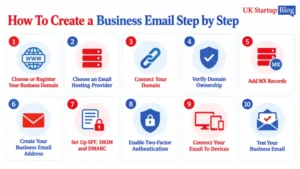
1. Choose or Register Your Business Domain
Start by choosing the domain that will appear after the @ symbol.
For a UK-focused business, a .co.uk domain can make the company’s location clear, while .com may work well for businesses targeting an international audience.
Keep the domain:
- Short And Memorable
- Easy To Spell
- Closely Related To The Business Name
- Free From Unnecessary Numbers Or Hyphens
- Suitable For Long-Term Use
Think beyond today’s business. Changing an established email domain later can create extra work across websites, invoices, customer records, logins and marketing materials.
2. Choose an Email Hosting Provider
The email host stores and manages your messages.
Google Workspace, Microsoft 365 and Zoho Mail are among the commonly used options, while many web hosting packages also include email.
Look beyond the cheapest monthly price. Consider:
- Mailbox Storage
- Number Of Users
- Aliases And Group Addresses
- Spam And Malware Protection
- Two-Factor Authentication
- Mobile And Desktop Apps
- Backup And Retention Features
- Customer Support
- Migration Tools
- Integration With Existing Business Software
A company already heavily using Word, Excel and Teams, for example, may value a different ecosystem from one built around Gmail, Drive and Google Docs.
3. Connect Your Domain
Once you select a provider, tell it which domain you want to use.
You will usually be asked to enter something such as:
yourbusiness.co.uk
The provider then gives you DNS records that need to be added through the company where your domain is managed.
4. Verify Domain Ownership
Email providers need to confirm that you control the domain before allowing you to use it.
Verification usually involves adding a special TXT record to your DNS settings. The provider then checks for that record.
This process does not normally affect your existing website because it simply adds a verification record rather than replacing the website’s DNS configuration.
5. Add MX Records
MX stands for Mail Exchange.
These records tell the internet which mail servers should receive email addressed to your domain.
For example, when someone sends an email to hello@yourbusiness.co.uk, the MX records tell the sending mail server where that message should be delivered.
Your provider will supply the exact MX values to add.
Do not copy MX settings from an unrelated tutorial because providers use different records. Always use the values supplied for your account.
DNS changes may begin working quickly, although some changes can take longer to become visible across the internet.
6. Create Your Business Email Address
Once the domain is connected, create the accounts your business actually needs.
For an individual employee, you might use:
- firstname@business.co.uk
- lastname@business.co.uk
- lastname@business.co.uk
You can then create functional addresses such as:
- hello@business.co.uk
- sales@business.co.uk
- support@business.co.uk
- accounts@business.co.uk
Avoid creating paid individual mailboxes unnecessarily. Some addresses can work as aliases or shared addresses rather than completely separate user accounts.
7. Set Up SPF, DKIM and DMARC
Creating the mailbox is only part of the setup.
Email authentication helps receiving systems determine whether a message claiming to come from your domain is legitimate.
- SPF identifies servers authorised to send email for your domain.
- DKIM adds a cryptographic signature to outgoing messages so receiving systems can verify them.
- DMARC creates a policy for messages that fail authentication and can provide reports showing attempts to misuse your domain.
The National Cyber Security Centre recommends these anti-spoofing controls because they make it harder for criminals to impersonate an organisation’s domain.
8. Enable Two-Factor Authentication
Two-factor authentication adds another barrier if a password is stolen.
Require it for employees where possible and pay particular attention to administrator accounts.
An administrator may be capable of resetting user passwords, changing security settings and accessing other company services.
A compromised admin account can therefore create a much larger problem than a compromised individual mailbox.
9. Connect Your Email To Devices
Most modern email providers offer their own web, mobile and desktop applications.
You may also be able to connect the mailbox to software such as Outlook or Apple Mail.
Check that employees can:
- Send And Receive Messages
- Access Calendars If Required
- Synchronise Contacts
- Use The Account On Approved Devices
- Access Shared Mailboxes Or Groups
Avoid automatically enabling old email protocols purely because a device requests them. Use the provider’s recommended connection method where possible.
10. Test Your Business Email
Do not assume everything is working because the account can send one message.
Test several scenarios:
- Send To An External Gmail Or Outlook Account
- Reply To The Business Address
- Send From Mobile And Desktop
- Check That Replies Arrive Correctly
- Test Aliases And Shared Addresses
- Check Spam Folders
- Confirm SPF, DKIM And DMARC Are Active
- Test Password Recovery
This catches configuration problems before customers encounter them.
Best Business Email Providers in 2026
There is no single provider that suits every company. The right option depends on existing software, budget, storage requirements and how many people will use the service.
Google Workspace
Google Workspace combines Gmail-based business email with tools including Drive, Docs, Sheets, Calendar and Meet.
As of September 2026, the UK Business Starter plan is listed at £5.90 per user per month with an annual commitment, while the flexible rate is £7 per user per month.
Pricing can change, so businesses should check current terms before purchasing.
It can suit companies already comfortable with Gmail and Google’s cloud-based productivity tools.
Microsoft 365
Microsoft 365 combines business email with Microsoft’s wider productivity ecosystem.
As of September 2026, Microsoft lists Business Basic at £5.40 per user per month when paid yearly, excluding VAT. The package includes custom business email alongside web and mobile Microsoft productivity tools.
It can be particularly practical for businesses already relying on Outlook, Word, Excel or Teams.
Zoho Mail
Zoho Mail offers custom-domain email alongside wider workplace and business-management tools.
It provides paid email plans and also advertises a limited free custom-domain email option in selected data centres. Free-plan availability and features can vary by region.
It may appeal to small businesses looking for a lower-cost standalone email option without needing the full Google or Microsoft ecosystem.
Web Hosting Email
Some web hosting packages include one or more email accounts.
This can reduce costs for very small businesses, particularly when the website and email are managed together.
However, compare mailbox limits, spam filtering, security, support and reliability rather than assuming bundled email provides the same features as a specialist business email platform.
Business Email Provider Comparison
| Provider | Indicative Entry Cost | Custom Domain | Wider Tools | Good Fit For |
| Google Workspace | From £5.90/User/Month On Annual Plan | Yes | Drive, Docs, Meet And More | Businesses Using Google Tools |
| Microsoft 365 | From £5.40/User/Month Annually, Excluding VAT | Yes | Outlook, Office Web Apps, Teams And More | Microsoft-Based Businesses |
| Zoho Mail | Free Option In Selected Regions And Paid Plans | Yes | Zoho Workplace Options | Cost-Conscious Small Businesses |
| Hosting Email | Varies By Hosting Package | Usually | Depends On Host | Simple Small-Business Setups |
Prices are indicative as of September 2026 and providers may change their plans, features and introductory offers.
How Much Does a Business Email Cost?
The email account itself may only be one part of the cost.
A business could pay for:
| Cost | Typical Charging Method |
| Domain Name | Usually Annual |
| Business Email | Often Per User Per Month |
| Extra Storage | Provider Dependent |
| Email Backup Or Archiving | May Cost Extra |
| Security Features | Included Or Plan Dependent |
| Migration Support | Free, Paid Or Plan Dependent |
For a solo business, one paid mailbox plus aliases may be enough.
A growing team should calculate the annual cost across every employee rather than comparing only the headline per-user figure.
For example, increasing from three users to 20 can make small differences in monthly pricing much more significant.
How To Choose a Professional Business Email Address?
Consistency matters more as the business grows.
A sole founder could comfortably use:
alex@business.co.uk
For larger teams, a format such as:
alex.smith@business.co.uk
can prevent confusion when several employees share the same first name.
Useful department addresses include:
- Sales@ For Sales Enquiries
- Support@ For Customer Assistance
- Accounts@ For Finance
- Careers@ For Recruitment
- Hello@ For General Enquiries
Avoid email addresses containing nicknames, unnecessary numbers or confusing strings of characters when communicating with customers.
Mailboxes vs Aliases vs Shared Email Addresses
These terms are often confused.
A mailbox normally has its own inbox, credentials and storage.
An alias is an additional email address that routes messages into an existing mailbox.
A shared or group address can allow multiple people to receive or manage messages sent to one address.
For example, a founder could have the mailbox:
emma@business.co.uk
with:
hello@business.co.uk
set as an alias.
A growing customer support team may instead need support@business.co.uk as a properly managed shared mailbox or group.
Understanding this difference can prevent a business from paying for unnecessary user accounts.
How To Create a Business Email With an Existing Domain?
You do not normally need a new domain if the business already owns one.
The basic process is:
- Choose Your Email Provider
- Add Your Existing Domain
- Verify Ownership Through DNS
- Replace Or Update The Relevant MX Records
- Create Your Mailboxes
- Configure SPF, DKIM And DMARC
- Test Incoming And Outgoing Messages
Take particular care when the domain already has working email. Changing MX records redirects future incoming messages, so plan the switch before deleting old accounts.
Keep access to the previous service until you are confident that mail has migrated and the new configuration is working.
Can You Create a Business Email for Free?
Yes, although genuinely free custom-domain business email options are more limited than standard personal email.
Possible routes include:
- Email Included With Existing Web Hosting
- A Limited Free Email Hosting Plan
- A Provider Free Trial
- Email Forwarding To Another Inbox
Check the limitations carefully.
Free options may restrict storage, users, mobile synchronisation, customer support, administrative features or email protocols.
For a company that depends heavily on email, paying a modest monthly amount can be worthwhile for stronger administration, support and continuity.
How To Move an Existing Email To a Business Email?
Businesses often create a professional domain address after initially operating from Gmail, Outlook or an older hosting account.
Do not simply create the new mailbox and abandon the old one.
Before migration:
- Back Up Important Messages
- Export Contacts Where Necessary
- Check Calendar Data
- Create New User Accounts
- Plan The DNS Change
- Identify Services Using The Old Address For Login Or Recovery
After switching, keep the old account available temporarily where practical.
You can also notify important customers, suppliers and partners of the new address and update it across invoices, websites, social profiles, directories and business documents.
How To Secure Your Business Email?
Email accounts are valuable targets because they may contain invoices, confidential files, password resets and conversations with customers.
Good security should include:
- Enable Two-Factor Authentication
- Use Unique Passwords
- Set Up SPF, DKIM And DMARC
- Give Each Employee Their Own Account
- Restrict Administrator Access
- Review Recovery Methods
- Remove Former Employees Promptly
- Keep Devices And Apps Updated
Do not allow an entire team to use one shared password for a mailbox if the provider offers proper shared access.
Individual access makes it easier to remove one employee without changing credentials for everyone else.
Common Business Email Setup Problems
| Problem | Possible Cause | What To Check |
| Emails Are Not Arriving | Incorrect MX Records | Domain DNS |
| Emails Are Going To Spam | Authentication Or Reputation Issue | SPF, DKIM And DMARC |
| Domain Will Not Verify | Incorrect TXT Record | Verification Record |
| Cannot Send Email | Account Or Outgoing-Mail Configuration | Provider Settings |
| Old Service Still Receives Messages | DNS Changes Have Not Fully Applied | MX Records |
| Email Works Online But Not On A Device | Incorrect App Configuration | Account Connection Settings |
| Staff Cannot Access Shared Email | Missing Permissions | Admin Console |
Avoid repeatedly changing DNS records while troubleshooting. First compare the current settings with the exact records provided by your email host.
Managing Business Email As Your Team Grows
A setup that works for two people may become difficult to manage when the business employs 20.
Create a repeatable process for new starters.
That process could include:
- Creating The Employee Account
- Applying The Standard Address Format
- Enabling Two-Factor Authentication
- Assigning Groups And Shared Mailboxes
- Setting Appropriate Permissions
- Adding A Standard Business Signature
- Recording Recovery And Admin Procedures
You also need an offboarding process.
Before closing an employee’s account, determine whether their messages, files or customer conversations need to be transferred to another person.
Do not leave former employees with continued access to company systems.
Consider retention and backups as well. Email providers differ in what can be recovered after deletion, so businesses with contractual, regulatory or operational retention requirements should check exactly how their chosen service handles archived and deleted messages.
Using Business Email For Marketing In The UK
Creating a business mailbox does not automatically give a company permission to send promotional emails to anyone whose address it possesses.
UK electronic marketing is governed by rules including the Privacy and Electronic Communications Regulations, while UK GDPR can also apply when personal information is being processed.
The ICO’s guidance distinguishes between different types of recipients and circumstances. For example, sending unsolicited marketing emails to individual subscribers generally requires consent unless a relevant soft opt-in applies.
Businesses should therefore separate ordinary customer-service communication from direct marketing and maintain appropriate consent, preference and unsubscribe records.
Business Email Setup Checklist
Before considering the setup complete, confirm that you have:
- Registered Or Connected The Correct Domain
- Verified Domain Ownership
- Added The Correct MX Records
- Created Staff Mailboxes
- Created Required Aliases Or Shared Addresses
- Configured SPF
- Configured DKIM
- Configured DMARC
- Enabled Two-Factor Authentication
- Set Account Recovery Options
- Tested Incoming Email
- Tested Outgoing Email
- Checked Spam Placement
- Configured Mobile And Desktop Access
- Added Professional Email Signatures
- Created A Staff Offboarding Process
- Reviewed Backup And Retention Settings
Completing each item creates a stronger foundation than simply opening a mailbox and beginning to send messages.
Conclusion
Creating a business email in 2026 involves more than choosing a professional-looking address.
A reliable setup combines a company-owned domain, suitable email hosting, correct DNS records and proper security controls.
Start with an address structure that can grow with the business, understand when to use mailboxes or aliases and configure SPF, DKIM, DMARC and two-factor authentication before relying on the account for important communication.
For a solo founder, the setup can remain relatively simple.
Growing businesses should also plan for shared addresses, employee access, migration, backups and account offboarding so the company’s email remains manageable as the team expands.
FAQs
Can I Create a Business Email Without a Website?
Yes. You can use a domain for email even if you have not built a website. You mainly need ownership of the domain and an email hosting service capable of using it.
Do I Need a Domain Name for a Business Email?
You generally need your own domain if you want an address such as name@yourbusiness.co.uk. Public Gmail or Outlook addresses can be used for business communication, but they are not custom-domain business email addresses.
Can I Get a Free Business Email Address?
Some hosting plans include email and certain providers offer limited free custom-domain plans. Check storage, user, support and device-access restrictions before relying on a free option.
Is Gmail Free for Business Email?
A standard Gmail account is free, but using Gmail with your own custom business domain normally requires a Google Workspace subscription.
What Is the Best Business Email Address Format?
Formats such as firstname@business.co.uk work well for small teams, while firstname.lastname@business.co.uk can be easier to manage as a company grows.
How Long Does It Take To Set Up a Business Email?
Creating the account itself can be quick, but domain verification and DNS changes may take longer to become active everywhere. Allow extra time when migrating an already active business email service.
Why Are My Business Emails Going To Spam?
Possible causes include missing SPF, DKIM or DMARC configuration, poor domain reputation, suspicious content or sending behaviour. Check authentication first before assuming the mailbox itself is faulty.

Expert Blogger | Strategic thinker anticipating future directions for UK business
Related Articles in Business
View All →
Is Raising Cane’s Opening in the UK? | London Locations Revealed
Yes, Raising Cane’s is officially coming to the UK. The American chicken restaurant brand plans to open its first UK restaurant at 22 Coventry Street in London’s West…

Best Parking App UK: 10 Startup-Led Parking Apps Compared for 2026
For most drivers, JustPark is the best parking app UK users can consider in 2026 because it combines parking search, advance booking and app-based payments in one platform.…

Cardzone UK Store Closures: Full List and Latest 2026 Update
Cardzone UK store closures are continuing in 2026, with several branches already gone from high streets and further shops now preparing to shut. The latest confirmed closures include…