
How to Start a YouTube Channel in 2027?: Complete UK Beginner & Business Guide

UK Startup Blog Archive
Table of Contents
Starting a YouTube channel in 2027 is free, but building one that attracts consistent viewers, earns revenue and supports a profitable business requires more than uploading videos.
The opportunity is particularly interesting for UK entrepreneurs, freelancers, small business owners and specialist content creators who want to develop an audience around their knowledge, products or services.
Our analysis of current YouTube requirements and business-focused content strategies suggests that beginners should concentrate on choosing a profitable niche, producing useful videos and understanding their audience before investing heavily in equipment or advertising.
A YouTube channel can become a marketing asset, an independent creator business or both. However, the financial returns depend on the niche, production costs, audience engagement and ability to convert attention into commercial value.
This guide explains how to start a YouTube channel from scratch, choose a suitable business niche, publish your first videos, understand the latest 2026 updates and prepare for YouTube monetisation in 2027.
How Do You Start a YouTube Channel in 2027?
To start a YouTube channel, sign in with a Google Account, create a personal or business channel, select a name and handle, complete the branding, verify the necessary features and upload your first original video.
Creating a channel does not require payment, professional equipment or a registered company.
| Step | What you need to do | Estimated time |
| 1 | Research your audience and niche | 1–3 days |
| 2 | Create or sign in to a Google Account | 5–10 minutes |
| 3 | Create your YouTube channel | 5–10 minutes |
| 4 | Choose a channel name and handle | 15–30 minutes |
| 5 | Set up branding and channel information | 30–90 minutes |
| 6 | Verify and secure your account | 10–30 minutes |
| 7 | Plan your first five videos | 2–4 hours |
| 8 | Record, edit and upload your first video | Several hours |
| 9 | Optimise titles, thumbnails and descriptions | 30–60 minutes |
| 10 | Review analytics and improve | Ongoing |
These times are planning estimates, not guaranteed completion times.
For a business-focused channel, we recommend preparing a simple business plan alongside the channel setup. This helps determine what success means commercially rather than relying entirely on subscribers.
Why Should Entrepreneurs Start a YouTube Channel in 2027?
YouTube offers businesses a combination of video discovery, educational content, product demonstrations, audience engagement and potential revenue generation.
Unlike a short-lived promotional campaign, useful videos may continue attracting relevant viewers long after publication. However, that ongoing traffic is never guaranteed.
A small UK accounting firm could publish explanations of business expenses, tax deadlines and bookkeeping processes. A retail startup might demonstrate products, answer delivery questions and compare buying options.
Both businesses could use YouTube to generate trust before a potential customer contacts them.
We evaluated the main commercial benefits using an editorial scoring framework covering audience relevance, long-term usefulness, revenue potential and implementation costs.
| Business benefit | Editorial score | Commercial value |
| Demonstrating professional expertise | 94% | Builds trust with potential clients |
| Explaining products and services | 92% | Helps customers make purchasing decisions |
| Generating qualified enquiries | 89% | Supports measurable customer acquisition |
| Building a recognisable brand | 88% | Strengthens market positioning |
| Developing a searchable video library | 87% | Creates reusable marketing content |
| Generating advertising revenue | 72% | Adds a potential income stream after eligibility |
| Achieving immediate sales | 48% | Results depend heavily on the offer and audience |
These scores represent our editorial assessment of strategic usefulness, not measured conversion rates or industry-wide survey results.
The strongest business opportunity is not necessarily becoming a famous YouTuber. A specialist creator with a relatively small but commercially relevant audience may generate more valuable leads than a larger entertainment channel.
This principle is equally relevant when developing broader online marketing strategies.
Which YouTube Niche Should You Choose in 2027?
Choosing a niche is one of the most important decisions when starting a YouTube channel.
A niche defines the specific audience, subject matter and problems your videos will address.
A broad channel about business, lifestyle, finance, travel and technology may struggle to establish a clear identity during its early stages.
A channel specialising in bookkeeping for UK freelancers, for example, offers viewers a much clearer reason to subscribe.
Best YouTube Niches for UK Creators and Entrepreneurs
| YouTube niche | Editorial opportunity score | Potential income model |
| B2B software tutorials | 93% | Affiliate income, consulting, sponsorships |
| Business and entrepreneurship | 91% | Courses, consulting, services |
| Professional skills and careers | 90% | Training, digital products |
| Home improvement and DIY | 88% | Product partnerships, advertising |
| Personal finance education | 86% | Advertising, suitable partnerships |
| Technology reviews | 85% | Affiliates, sponsorships |
| Local business education | 84% | Leads and customer enquiries |
| Gaming tutorials and guides | 79% | Advertising, partnerships |
| Fitness and wellness education | 78% | Coaching, suitable products |
| General lifestyle vlogging | 57% | Sponsorships and advertising |
These opportunity scores are based on our qualitative evaluation of niche clarity, potential commercial demand, repeatable content and competition. They are not predictions of earnings.
Our preferred approach for 2027: choose a subject where you can demonstrate genuine knowledge, answer recurring questions and identify a realistic revenue opportunity.
For example, rather than launching a broad entrepreneurship channel, consider a channel focused on how sole traders manage expenses, pricing, invoices and customer relationships.
Before selecting a niche, conduct market research by checking search suggestions, competitor videos, audience questions and existing products or services.
Look for topics where audiences repeatedly ask similar questions, struggle with incomplete explanations or need examples based on UK circumstances.
How Much Does It Cost to Start a YouTube Channel in the UK?
Creating a YouTube channel is free, although production costs can increase as the channel develops.
A beginner can use an existing smartphone, natural lighting and free editing software. Professional cameras, studios and editing teams are optional.
| Equipment or expense | Budget approach | Enhanced setup |
| YouTube channel registration | £0 | £0 |
| Camera | Existing smartphone | £300–£1,000+ |
| Microphone | £15–£50 | £80–£200 |
| Lighting | Natural light | £40–£150 |
| Tripod | £10–£30 | £30–£100 |
| Editing software | Free tools | Paid subscription |
| Thumbnail design | Free tools | Paid design software |
| Background and accessories | Existing room | £50–£200+ |
Prices are illustrative planning ranges, not verified supplier quotations.
We recommend three different starting budgets:
- Basic creator setup: £0–£150: Best for educational videos, simple demonstrations, mobile recordings and creators testing their first niche.
- Small business setup: £150–£600: Suitable for entrepreneurs producing regular tutorials, product explanations, interviews and branded videos.
- Enhanced creator setup: £600–£2,000+: More appropriate for established businesses or creators whose production quality directly affects commercial opportunities.
For most beginners, better sound quality, reliable lighting and a useful script offer more immediate value than buying an expensive camera.
If the channel is being developed as a commercial venture, include the initial spending in a startup budget and separate one-off equipment purchases from recurring software or editing costs.
How Can You Create a YouTube Channel Step by Step?
The following process reflects the current official YouTube channel creation workflow.
Step 1: Create or Sign In to Your Google Account
Visit YouTube and sign in with an existing Google Account.
If you do not already have an account, create one before continuing.
For a business channel, consider using a dedicated account controlled by the business rather than an employee’s personal account.
This reduces the risk of losing access when staff responsibilities change.
Businesses should also use suitable channel permissions instead of sharing account passwords.
A professional business email can help establish consistent company communications, although a custom-domain email address is not mandatory for channel creation.
Step 2: Create Your Personal or Business Channel
After signing in:
- Select your profile picture.
- Open Settings.
- Find the option to add or manage channels.
- Select Create a channel.
- Choose your profile picture, name and handle.
- Complete the creation process.
A personal channel is suitable for an individual creator who manages everything independently.
A business-name channel connected to a Brand Account can be more suitable when a company needs separate management and ownership arrangements.
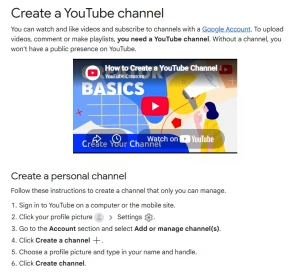
Official YouTube channel creation screen showing the options to create a channel, select a name and choose a unique handle.
Step 3: Choose a YouTube Channel Name and Handle
A good channel name should communicate the business identity or subject without becoming unnecessarily complicated.
Avoid names that are difficult to spell, excessively long or confusingly similar to established brands.
Examples of descriptive channel concepts include:
- UK Startup Finance
- Everyday Home Repairs
- Practical Business Technology
- Independent Retail Academy
- Digital Skills Explained
These are illustrative naming concepts, not verified available channel names.
Check the availability of the corresponding YouTube handle, website domain and other social media usernames.
A handle acts as a unique identifier for your channel, while the channel name is its public display name.
If you intend to build a wider business around the channel, securing a suitable domain name can help protect brand consistency.
Step 4: Customise Your YouTube Channel
Open YouTube Studio and select Customisation.
The Home tab controls the presentation of your channel, while the Profile tab allows you to manage branding and channel information.
A complete channel should include:
- A recognisable profile image
- A clear banner
- A relevant channel description
- A consistent channel handle
- Appropriate website links
- Organised playlists when videos become available
- A channel trailer where useful
Your description should explain who the channel helps, what it covers and why its content is valuable.
For example:
We publish practical video guides for UK freelancers, startups and small business owners covering business finances, digital tools, marketing and everyday business decisions.
Avoid filling the description with repetitive search keywords.
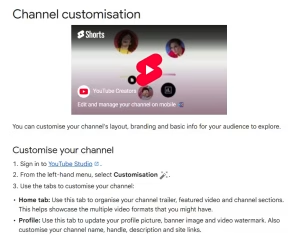
YouTube Studio channel customisation dashboard showing the Home and Profile sections used to edit branding, channel description and website links.
Step 5: Verify Your Channel and Enable Available Features
YouTube provides different levels of channel features, and some tools require phone verification or additional eligibility checks.
Feature access can affect functions such as custom thumbnails, longer uploads and advanced creator tools.
To review your access, open YouTube Studio and navigate to Settings → Channel → Feature eligibility.
Follow the instructions provided for your account.
Also activate two-step verification and keep recovery information updated.
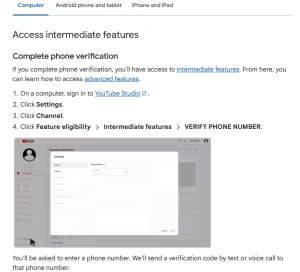
YouTube Studio Feature eligibility settings showing the available creator features and verification requirements.
Step 6: Upload Your First YouTube Video
Select Create → Upload videos in YouTube Studio.
Choose your video file and complete the upload details, including:
- Video title
- Description
- Thumbnail, where available
- Playlist
- Audience designation
- Relevant disclosures
- Subtitles and additional details
- Visibility settings
YouTube requires creators to indicate whether content is made for children. This is a compliance designation, not simply a description of whether children might watch the video.
You can initially upload as private or unlisted while checking the video, then publish or schedule it.
For a business channel, the first video should answer a real customer question rather than simply announce that the business has joined YouTube.
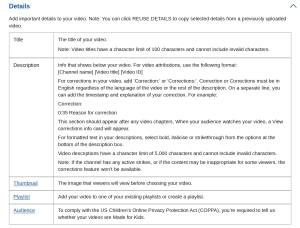
Official YouTube Studio video upload screen displaying the title, description, thumbnail, audience selection and visibility options.
What Type of YouTube Videos Should Beginners Make?
The best initial video format depends on the audience’s needs and the resources available.
Our evaluation suggests that educational and problem-solving formats are especially suitable for business-focused channels because viewers can understand the value before committing to a purchase.
| Video format | Best use | Editorial suitability |
| Step-by-step tutorials | Teaching practical skills | 95% |
| Product demonstrations | Explaining features and use | 93% |
| Problem-solving guides | Answering targeted questions | 94% |
| Software walkthroughs | Showing digital processes | 92% |
| Expert interviews | Providing specialist perspectives | 85% |
| Case studies | Demonstrating genuine outcomes | 90% |
| Behind-the-scenes content | Building brand familiarity | 78% |
| General promotional videos | Announcing offers | 58% |
The scores reflect suitability for an early-stage business channel, not expected viewer retention.
One useful method is to build a channel around three content pillars.
For a business software channel, these could be beginner tutorials, tool comparisons and troubleshooting guides.
For a local retail business, they could be product demonstrations, buyer questions and practical after-sales advice.
This creates a consistent identity while allowing variation in the individual videos.
How Should You Plan Your First 10 YouTube Videos?
Publishing one introductory video and waiting for subscribers is unlikely to provide sufficient information about what your audience wants.
Instead, plan a series of closely related videos around a specific niche.
For example, a channel covering UK freelance business management could launch with:
| Video | Suggested title | Primary audience need |
| 1 | How to Start Freelancing in the UK | Getting started |
| 2 | Sole Trader vs Limited Company Explained | Business structure |
| 3 | How to Send Your First Client Invoice | Practical tutorial |
| 4 | Common Freelance Business Expenses | Financial management |
| 5 | How to Price Freelance Services | Pricing |
| 6 | Best Ways to Find Freelance Clients | Customer acquisition |
| 7 | How to Track Business Income and Expenses | Bookkeeping |
| 8 | How to Create a Freelance Portfolio | Credibility |
| 9 | Five Mistakes New Freelancers Make | Problem prevention |
| 10 | How to Build a Monthly Freelance Budget | Business planning |
This approach allows a creator to build several related videos rather than competing across unrelated topics.
It also creates opportunities to organise videos into playlists and recommend appropriate follow-up content.
Businesses can connect this strategy with broader advertising activity by using videos to answer questions that appear repeatedly during the buying process.
Our recommendation is to treat the first 10 videos as an experiment. Assess which topics generate meaningful audience interest before deciding where to invest more time.
Should You Focus on YouTube Shorts or Long-Form Videos in 2027?
Both formats can be useful, but they serve different purposes.
YouTube Shorts can introduce an idea quickly, demonstrate a simple process or reach viewers who are unfamiliar with the channel.
Long-form videos provide more room for detailed explanations, comparisons, interviews and demonstrations.
| Factor | YouTube Shorts | Long-form YouTube videos |
| Common purpose | Fast discovery | Detailed education |
| Video length | Up to three minutes for qualifying Shorts | Longer, depending on upload limits |
| Content style | Concise and visually direct | More detailed |
| Business use | Awareness and quick tips | Trust, explanation and leads |
| Production effort | Often lower per video | Often higher |
| Advertising income | Shorts revenue model | Watch-page advertising model |
| Best audience action | Discover another video | Learn more, enquire or purchase |
A sensible business-led publishing plan might include one substantial educational video each week, supported by two or three related Shorts.
This is a proposed production schedule, not a YouTube requirement.
For example, an eight-minute video explaining how to launch an online shop could generate separate Shorts about product pricing, payment mistakes and choosing an ecommerce platform.
The shorter videos should deliver independent value rather than existing solely as advertisements for the longer video.
How Can You Grow a YouTube Channel From Zero Subscribers?
YouTube growth depends on several interacting factors, including topic relevance, viewer satisfaction, presentation and the ability to retain attention.
There is no guaranteed formula for reaching a particular subscriber count.
A practical growth strategy should include the following.
- Choose searchable video topics: Start with questions viewers are already asking. YouTube search suggestions, competitor videos and relevant customer enquiries can provide useful ideas.
- Create clear titles: Explain the value of the video without exaggeration. For example, “How to Calculate Freelance Hourly Rates in the UK” is more specific than “My Biggest Money Secret“.
- Design recognisable thumbnails: Use clear imagery, relevant visual context and a consistent style. Avoid misleading representations of the video’s content.
- Improve the opening: Explain the subject and establish its usefulness early. Unnecessarily long introductions may discourage viewers who need an immediate answer.
- Connect related videos: Use playlists, descriptions, cards and end screens where eligible and appropriate.
- Promote to relevant audiences: Share videos with existing customers, newsletters, websites and professional communities when the topic genuinely serves their interests.
For founders who already use social media, relevant videos can also support Instagram advertising or broader cross-platform marketing campaigns.
However, repeatedly sharing videos in unrelated groups can damage audience trust and is unlikely to create sustainable engagement.
How Does YouTube SEO Work in 2027?
YouTube SEO helps videos become understandable and discoverable for relevant search queries.
It begins with identifying what viewers want, not simply adding keywords to every available field.
An effective optimisation process should include:
- Research the main question your video answers.
- Use an accurate, descriptive title.
- Introduce the subject naturally in the video.
- Write a useful description with relevant context.
- Add chapters for longer videos where appropriate.
- Create readable, relevant thumbnails.
- Include accurate subtitles when possible.
- Organise related videos into playlists.
- Review the search terms and traffic sources in YouTube Analytics.
- Improve future videos based on observed viewer behaviour.
For example, a new business owner searching for “how to start a YouTube channel for business” is likely to want practical setup instructions, equipment advice, branding information and a commercial content strategy.
A video that answers those questions accurately provides more value than one that simply repeats the search phrase.
YouTube also offers A/B testing for eligible long-form videos. Creators with access can test up to three title and thumbnail variations, with YouTube assessing the alternatives based on watch time.
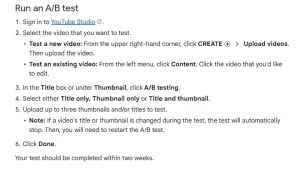
YouTube Studio title and thumbnail A/B testing interface showing the available test variations for an eligible long-form video.
Which YouTube Updates From 2026 Matter Most for 2027?
Starting a channel for 2027 requires an understanding of recent YouTube changes, especially those affecting analytics, monetisation and content production.
1. YouTube’s August 2026 View-Counting Update
From 24 August 2026, YouTube changed its general view-counting approach so views are counted when videos begin playing across formats, including long-form videos, Shorts and live streams.
However, this does not mean every displayed view qualifies for creator earnings or YouTube Partner Programme eligibility.
Qualified views, engaged views and eligible watch hours remain important distinctions.
For businesses, this makes it especially important to evaluate meaningful engagement rather than using public view counts as the only measure of success.
2. Shorts Can Run for Up to Three Minutes
Eligible vertical or square uploads can be categorised as YouTube Shorts when they run for up to three minutes.
This creates opportunities for more substantial product demonstrations, short educational lessons and concise business tutorials.
Creators should still consider copyright and music restrictions, particularly when producing Shorts longer than one minute.
3. Original Content Remains Essential for Monetisation
YouTube clarified its inauthentic content policy in July 2025, including restrictions relating to repetitive, mass-produced and minimally differentiated content.
This is particularly relevant to creators using AI tools.
AI-assisted scripts, editing and other production workflows are not automatically prohibited, but the finished content must comply with YouTube’s policies.
A channel that repeatedly publishes generic automated slideshows without meaningful commentary or educational value may encounter monetisation problems.
For 2027, we recommend making originality, genuine subject knowledge and editorial review central to the production process.
4. More Testing Options for Titles and Thumbnails
YouTube’s title and thumbnail testing tools give eligible creators an opportunity to evaluate competing presentation ideas.
Rather than relying solely on instinct, a creator can compare alternatives and examine the resulting watch-time performance.
However, the feature is not available for every account, content type or video.
5. Greater Importance of Commercial Transparency
UK creators need to consider both platform rules and advertising law when publishing sponsored or affiliate-supported content.
The Advertising Standards Authority published updated influencer advertising guidance in October 2026.
This reinforces the importance of clearly identifying commercial relationships rather than hiding sponsorship information in lengthy descriptions.
How Many Subscribers Do You Need to Make Money on YouTube in 2027?
YouTube offers different monetisation pathways depending on eligibility, location and the features available to a particular channel.
It is important to distinguish early Partner Programme access from eligibility for advertising revenue.
| Monetisation level | Subscriber requirement | Additional threshold |
| Expanded YPP access | 500 | Three public uploads in 90 days, plus 3,000 qualified public long-form watch hours in 365 days or 3 million qualified Shorts views in 90 days |
| Full advertising revenue eligibility | 1,000 | 4,000 qualified public long-form watch hours in 365 days or 10 million qualified Shorts views in 90 days |
Meeting these thresholds does not automatically mean a channel will be accepted.
YouTube also reviews compliance with monetisation policies and other eligibility requirements.
Expanded Partner Programme access can provide eligible creators with features such as memberships, Super Thanks and other fan-funding or Shopping opportunities.
Full advertising eligibility can provide access to watch-page advertising, Shorts Feed advertising and YouTube Premium revenue sharing, subject to applicable requirements.
Important 2027 Shorts change: YouTube has announced that from 1 February 2027, eligibility for monthly Shorts Creator Pool advertising and associated YouTube Premium revenue will require at least 10 million qualified Shorts views during the applicable rolling 90-day measurement period.
This is a distinct ongoing revenue requirement, not simply a one-time channel application milestone.
Creators should check their current eligibility inside YouTube Studio before relying on projected advertising income.
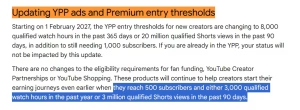
YouTube Studio Earn dashboard showing subscriber progress, qualified watch-hour or Shorts-view requirements and available monetisation features.
How Much Money Can a YouTube Channel Make in the UK?
There is no fixed amount YouTube pays for every subscriber or view.
Creator earnings depend on monetisation status, audience geography, advertising demand, video format, topic, eligible views and other factors.
For financial planning, creators often use RPM, or revenue per mille, to measure earnings per 1,000 views.
Consider the following illustrative long-form advertising scenarios.
| Monthly video views | £2 RPM | £5 RPM | £8 RPM |
| 10,000 | £20 | £50 | £80 |
| 50,000 | £100 | £250 | £400 |
| 100,000 | £200 | £500 | £800 |
| 250,000 | £500 | £1,250 | £2,000 |
| 500,000 | £1,000 | £2,500 | £4,000 |
These are mathematical scenarios, not verified UK RPM benchmarks or forecasts. They assume the views are included in the RPM calculation and that the channel is eligible for the relevant income.
A creator’s actual RPM may be lower or higher, while a channel without advertising eligibility may earn nothing from watch-page ads.
For businesses, advertising revenue may not be the most important commercial benefit.
A channel attracting a modest number of relevant prospective customers can sometimes produce stronger financial returns through services, products or consulting.
What Other Ways Can a YouTube Channel Generate Income?
Potential income sources include:
- Advertising revenue through YPP
- Sponsorship arrangements
- Affiliate commissions
- Paid memberships
- Digital products and courses
- Consulting or professional services
- Physical products
- Customer enquiries and bookings
- Eligible YouTube Shopping features
Some of these activities can begin before a channel qualifies for YouTube advertising revenue, provided the business follows the relevant platform, legal and advertising requirements.
A professional consultant with 2,000 targeted monthly viewers, for example, may find the channel commercially useful even without a large subscriber base.
How Can a Business Calculate Its YouTube Return on Investment?
One major weakness in many beginner YouTube plans is the lack of a financial performance model.
Businesses should calculate whether the channel generates a reasonable commercial return after accounting for the cost of producing content.
Consider this hypothetical UK service business.
| Metric | Illustrative monthly result |
| YouTube views | 5,000 |
| Website click-through from views | 2% |
| Website visits | 100 |
| Enquiry conversion rate | 4% |
| Qualified enquiries | 4 |
| Enquiry-to-sale conversion rate | 25% |
| New customers | 1 |
| Revenue from the new customer | £1,000 |
| Contribution after direct service costs | £500 |
| Monthly video production cost | £200 |
| Contribution after video production | £300 |
All figures and percentages in this example are assumptions used to demonstrate a financial model, not results from an actual company.
The business would generate £300 in contribution after the specified production costs, before other overheads and taxes.
This is more useful than claiming the channel is successful simply because it receives thousands of views.
Businesses should also track customer acquisition cost, lead quality, returning customers, conversion rates and the long-term value of customers acquired through video content.
These metrics can inform the wider business marketing strategy.
Do UK YouTubers Need to Pay Tax in 2027?
YouTube income can create tax obligations when it is earned as part of a trade or business.
Potential sources include advertising payments, sponsorships, affiliate income, merchandise sales and paid services.
Creators should keep accurate records of income, business expenses, invoices and payments.
For the 2026–27 tax year, the general trading allowance is £1,000, subject to eligibility conditions and exceptions.
However, in the October 2026 Budget documents, the UK government announced plans to increase the trading allowance and related Self Assessment reporting threshold to £3,000 from 6 April 2027, through the Finance Bill 2026–27.
This is a proposed change for the 2027–28 tax year onwards, so creators should check the final legislation and HMRC guidance before relying on it.
Importantly, the trading allowance relates to qualifying gross trading income before expenses, not simply the profit left after costs.
A creator can choose to trade as a sole trader or through another appropriate legal structure.
The correct arrangement depends on the nature, scale and risks of the business.
For smaller independent creators, understanding how to register as a sole trader is a sensible starting point when registration becomes necessary.
Creators should also maintain suitable bookkeeping records, consider VAT where relevant and review the tax treatment of non-cash benefits such as gifted products.
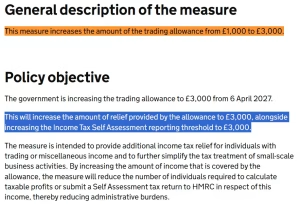
GOV.UK’s October 2026 announcement explaining the proposed increase in the trading allowance to £3,000 from 6 April 2027.
What Legal Rules Should UK YouTube Creators Understand?
Alongside tax, creators need to consider copyright, advertising transparency, personal information and platform policies.
Using music, video clips, photographs or illustrations without appropriate permission can result in copyright claims or other consequences.
Creators should obtain suitable rights or use assets they are permitted to include.
Sponsorship and affiliate arrangements also require careful disclosure.
The October 2026 ASA guidance explains that commercial content should be clearly identifiable as advertising where the relevant rules apply.
For example, a creator paid to recommend software should clearly disclose the commercial arrangement.
A YouTube paid-promotion declaration is also required for content falling within the platform’s applicable disclosure rules. It does not necessarily replace any additional disclosures required under UK advertising law.
Creators publishing realistic altered or synthetic content should review YouTube’s disclosure requirements.
Businesses also need permission to film people where required, appropriate handling of personal data and care when discussing regulated areas such as financial advice, medical information or legal matters.
Maintaining accurate information and transparent commercial relationships is important for long-term channel credibility.
How Can You Manage a YouTube Channel Alongside a Business?
For an entrepreneur, producing videos should not displace essential work such as customer service, financial administration and sales.
A sustainable approach involves batching related tasks.
For example, a business owner could dedicate one session to researching several topics, another to recording and a third to editing, uploading and preparing thumbnails.
A sample weekly production schedule could be:
| Activity | Suggested allocation |
| Research and topic selection | 1 hour |
| Script or outline preparation | 1.5 hours |
| Recording | 2 hours |
| Editing | 3 hours |
| Thumbnail and upload preparation | 1 hour |
| Analytics review | 30 minutes |
| Total | 9 hours |
These are illustrative allocations that depend on video complexity and production experience.
For a company planning more ambitious production, outsourcing editing or thumbnail creation may become worthwhile when the cost is lower than the value of management time saved.
A business considering YouTube as a serious marketing channel should include the activity in its wider business setup and operational planning.
How Should You Measure YouTube Performance?
YouTube Studio provides analytics that can help creators understand how viewers discover and interact with their content.
The most useful metrics depend on the channel’s objectives.
| Metric | What it helps measure |
| Impressions | How often thumbnails are shown in eligible YouTube surfaces |
| Impressions click-through rate | How often an impression leads to a view |
| Average view duration | How long viewers watch on average |
| Audience retention | Where viewers continue watching or leave |
| Returning viewers | Repeat audience behaviour |
| Qualified watch hours | Progress towards relevant monetisation eligibility |
| Engaged Shorts views | Meaningful Shorts engagement |
| Website visits | Traffic reaching a business-owned destination |
| Leads and sales | Commercial results from the channel |
Our preferred analytical approach is to separate audience growth from business performance.
A video receiving 20,000 views may be valuable for awareness but generate no customers.
Another video receiving only 1,000 views may attract the exact audience needed for a professional service.
Both results can be useful, but they should not be judged using identical commercial expectations.
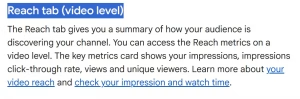
YouTube Studio analytics dashboard showing video reach, impressions, click-through rate, average view duration and audience retention.
What Is a Realistic 90-Day YouTube Launch Plan?
We recommend dividing the first three months into research, publication and optimisation.
| Period | Main activity | Recommended outcome |
| Days 1–7 | Select niche and audience | Clear channel positioning |
| Days 8–14 | Create and customise channel | Complete channel setup |
| Days 15–21 | Research and script initial videos | Five prepared topics |
| Days 22–30 | Record and publish first videos | Initial content available |
| Days 31–45 | Continue relevant uploads | Build content consistency |
| Days 46–60 | Review early viewer behaviour | Identify stronger subjects |
| Days 61–75 | Improve thumbnails and introductions | Better content presentation |
| Days 76–90 | Review results and plan next quarter | Evidence-based content strategy |
A reasonable output goal might be eight to twelve long-form videos over 90 days, depending on available production resources.
However, volume alone should not be the objective.
Publishing four excellent videos that genuinely answer customer questions can be more useful than producing dozens of low-quality uploads.
After the first 90 days, evaluate whether the channel has developed a clear audience, whether production is sustainable and whether its financial or strategic value justifies continued investment.
What Mistakes Should New YouTubers Avoid?
Several common decisions can make early growth more difficult.
- Choosing an excessively broad niche: Publishing unrelated topics makes it harder to establish a consistent audience.
- Buying expensive equipment before testing demand: High production costs increase financial risk without guaranteeing better performance.
- Using copied or minimally changed content: Reused or inauthentic material may create copyright or monetisation problems.
- Focusing entirely on subscribers: Subscriber growth does not necessarily translate into watch time, leads or income.
- Expecting instant advertising revenue: Monetisation requires eligibility, review and sustained compliance.
- Ignoring titles and thumbnails: Useful videos can struggle to attract attention if their presentation is unclear.
- Publishing without reviewing analytics: Creators miss opportunities to understand what their audience values.
- Failing to disclose sponsorships: Hidden commercial relationships can damage trust and create compliance risks.
- Relying on one platform for all customers: Businesses should maintain their own website, customer relationships and alternative marketing channels.
A YouTube channel should support a business, not become an uncontrolled expense.
Conclusion: Is 2027 a Good Time to Start a YouTube Channel?
Starting a YouTube channel in 2027 can be a worthwhile opportunity for individuals and businesses prepared to invest consistently in useful content.
The initial setup is straightforward and does not require major financial investment. The greater challenge is selecting a focused niche, producing original material, attracting an appropriate audience and building a sustainable commercial model.
Our analysis favours a measured approach: begin with existing equipment, validate audience demand, develop a connected library of useful videos and invest further only when the results justify the cost.
For UK businesses, the most valuable YouTube channel may not be the one with the most subscribers. It may be the one that consistently attracts potential customers, demonstrates professional expertise and contributes to profitable long-term growth.
The starting point is simple: choose one audience, identify one valuable problem and publish one genuinely useful video. Build from the evidence that follows.
Frequently Asked Questions
Can I Start a YouTube Channel for Free in 2027?
Yes. You can create a YouTube channel for free using a Google Account. A smartphone and free editing tools may be sufficient to produce your first videos
Can I Start a YouTube Channel Using Only My Phone?
Yes. YouTube supports mobile content creation and uploads. Beginners can film, edit and publish videos using a suitable smartphone.
Do I Need 1,000 Subscribers to Make Money on YouTube?
Not for every income source. Some creators can earn through services, sponsorships or affiliate arrangements earlier, and eligible creators may access certain YouTube features at lower Partner Programme thresholds.
Full advertising revenue eligibility normally requires at least 1,000 subscribers plus the applicable watch-hour or Shorts-view requirement.
Which YouTube Niche Is Best for Beginners in the UK?
A niche based on genuine knowledge, identifiable audience demand and repeatable video topics is often a sensible choice. Business tutorials, professional skills, technology demonstrations and DIY education are possible examples.
How Long Does It Take to Grow a YouTube Channel?
There is no guaranteed timeline. Growth depends on content quality, competition, audience demand, publishing consistency and viewer satisfaction. A 90-day launch period is useful for collecting initial information, but substantial growth may take considerably longer.
Can I Start a Faceless YouTube Channel in 2027?
Yes. Tutorials, screen recordings, animations and narrated demonstrations can work without showing the creator’s face. The content should still be original, useful and compliant with YouTube’s policies, including applicable rules for reused and inauthentic content.
Is Starting a YouTube Channel Worth It for a Small Business?
It can be worthwhile when videos solve relevant customer problems and support measurable business objectives. The strongest results may come from enquiries, product education and customer trust rather than advertising revenue alone.

Expert Blogger | Strategic thinker anticipating future directions for UK business
Related Articles in Business
View All →
Flat Pack or a Ready-Made Display? When Is It Worth Paying Extra for Manufacturer Assembly?
Paying extra for assembly performed by a manufacturer of cardboard packaging and POS displays is worthwhile when the cost of an error or delay in-store is higher than…

Starting a Business in London: How to Identify Market Trends and Emerging Opportunities
London remains one of the UK’s most attractive destinations for entrepreneurs, offering access to international markets, skilled professionals, diverse communities and a thriving business ecosystem. However, starting a…
Is Wetherspoons a Franchise? Costs, Ownership, Requirements and How to Apply in 2026
Yes, Wetherspoons is a franchise. J D Wetherspoon, one of Britain’s largest pub operators, now offers franchise opportunities to eligible hospitality businesses, experienced operators, investors and organisations. However,…